
Free credential scanner for AI assistants
Your credentials are in your AI history.
Every key your assistant read is in a plain-text transcript on your disk, and on the model provider’s servers. Find them before someone else does.
Credential exposed
ANTHROPIC_API_KEY
sk-ant-api03-7Kq2Xw9mDEMO
- Found in
- ~/.claude/projects/…/5b1e0c.jsonl
- Also sent to
- model provider
The AI tools on your machine
Agents, IDEs, harnesses and local models.
Scanned todayComing soon
 Claude CodeScanned
 CursorScanned
OCodex CLIScanned
 Gemini CLIScanned
AGoogle AntigravityScanned
 GitHub CopilotScanned
 Windsurf
 OpenCodeScanned
OCOpenClaw
HHermes Agent
 OllamaScanned
 LM StudioScannedClaude DesktopScanned
CChatGPT desktop
 ClineScanned
RRoo CodeScanned
CContinueScanned
KKilo CodeScanned
QAmazon Q DeveloperScanned
JJanScanned
JJunieScanned
DDevin CLIScanned
AAiderScanned
GGooseScanned
 AmpScanned
 Zed
Zed JetBrains AI
KKiro
 Qwen CodeScanned
 Trae
TraeCCrush
WOpen WebUI
Today Afterprompt scans the 22 tools marked Scanned above, on macOS, Linux and Windows (natively, WSL optional). The rest are on the roadmap. Vote for the next one.
140credential formats recognised
6 minto scan 3.5 GB of AI history
3platforms: macOS, Linux, Windows
0network calls while scanning

The problem
One key. Two copies.
Saved on your disk
Deleting the chat fixes neither. Rotating the key fixes both.
How keys get there
Six ordinary moments. Six leaked keys.
The agent reads your .env
$ cat .env
OPENAI_API_KEY=sk-proj-…DEMO
It dumps the environment
$ printenv | grep TOKEN
GITHUB_TOKEN=ghp_Xq…DEMO
You paste a key to get unstuck
you: still 401, here’s the key
sk-ant-api03-…DEMO
An MCP server needs a token
"env": {
  "SLACK_TOKEN": "xoxb-…DEMO" }
It writes a curl command
curl -H "Authorization: Bearer
  eyJhbGc…DEMO" api/v1/…
An error prints a connection string
connect failed: postgres://app:
••••••DEMO@db.prod:5432
How it works
Every leaked key, in minutes.
-
Scan
Transcripts, chat databases and caches — on Windows, and on both sides of WSL when you use it
-
Match
Your own live keys, 140 vendor formats, hidden payloads
-
Rotate
A short list, with where to revoke each key
Reads the keys set up on your machine (.env files, AWS, Azure, gcloud, SSH, npm, PyPI, kube) and finds those exact values in AI history. No guessing.
140 patterns for vendor keys, private keys, JWTs, auth headers and connection strings.
Deep mode decodes base64, escaped JSON, gzip and JWTs, then checks again.
What it catches
140 credential formats, and your own keys.
- Anthropic
- OpenAI
- Google Cloud
- Gemini
- AWS
- Azure
- GitHub
- GitLab
- Hugging Face
- xAI
- Groq
- OpenRouter
- Stripe
- Slack
- Atlassian
- Notion
- Linear
- npm
- PyPI
- Docker Hub
- Cloudflare
- Vercel
- DigitalOcean
- Supabase
- Twilio
- SendGrid
- Sentry
- Datadog
- Discord
- Telegram
- Shopify
- Mailgun
- Private keys
- JWTs
- Bearer tokens
- Database URLs
- Webhooks
- Passwords in prompts
False alarms are set aside automatically: placeholders, example files, expired tokens, local databases and code shipped inside plugins.
The report
Know exactly what to rotate.
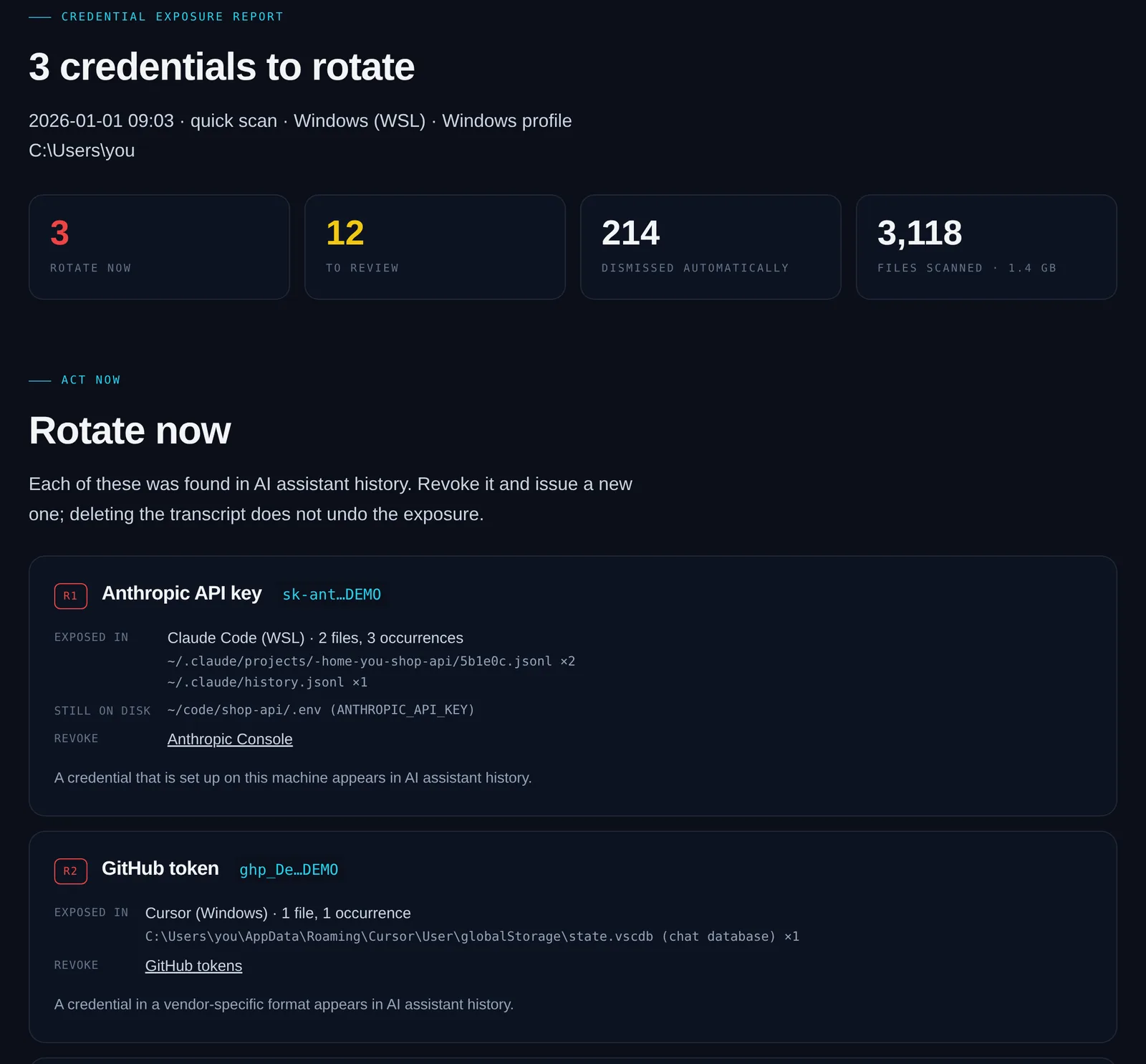
- Masked first 6 and last 4 characters only
- Where it leaked tool, session and file
- Still on disk the .env that holds it
- Revoke link straight to the right console
Why another scanner
Repo scanners watch git. Nobody watches the chat.
| Capability | Repository secret scanners | Afterprompt |
|---|---|---|
| Scans commits and repositories | ||
| Scans AI assistant transcripts and chat databases | ||
| Checks your live keys against that history | ||
| Decodes keys hidden inside chat payloads | ||
| Runs entirely on your machine, no account | varies |
Use both: keep your repository scanner, and add Afterprompt for what your AI tools remember.
Trust
Safe to run on your own machine.
Runs locallyNothing leaves your machine
Read-onlyNever edits your files
Masked outputFull keys never written out
Source availableRead every line before you run it
Questions
FAQ
Does Afterprompt upload anything?
No. It runs on your machine and makes no network calls while scanning. The only download is ripgrep, if you don’t have it, verified against a pinned checksum.
Will it delete or change my AI history?
No. It only reads. You decide what to rotate and what to clean up.
Which AI tools does it scan today?
The 22 tools marked “Scanned” above, on macOS, Linux and Windows. Extension agents are found in every VS Code-family editor they run in. On Windows it runs natively — WSL is not required — and if you do use WSL, one run covers the Windows profile and every WSL distribution, with one report. The tools marked “coming soon” above are on the roadmap.
It found a key. What should I do?
Revoke it and issue a new one. The report links to the right console. Then remove the copies still on disk and move secrets into environment variables or a secrets manager.
Isn’t deleting the transcript enough?
No. The key was already sent to the model provider as chat context. Only rotating it makes the old value useless.
Is it free?
Yes. Use it on your own machines, at work and for your clients. The source is public under FSL-1.1-ALv2: the only thing it rules out is selling a competing product or service. Each release becomes Apache 2.0 after two years.

Check your machine.
Three commands. A few minutes. A list of what to rotate.
git clone https://github.com/am-consultingai/afterprompt.git
cd afterprompt
./afterprompt.sh
On Windows run afterprompt.cmd instead of the last line — no WSL needed.
Python 3.9+ · macOS, Linux, Windows (WSL not required) · all options
It can’t tell whether a key still works, or delete the provider’s copy. Rotating does that.